
How Does Cloud Storage Work: a Simple, Compelling Guide

Think of cloud storage as a digital self-storage unit, but way smarter and accessible from anywhere on the planet. Instead of cramming files onto your computer's limited hard drive, you're handing them over to a professional service that keeps them safe in a massive, high-tech facility.
This simple act frees up precious space on your devices and, more importantly, lets you get to your files whether you're on your phone, a new laptop, or a friend's tablet.
The Core Idea Behind Cloud Storage
So, how does it all actually work? At its most basic, the entire system relies on a three-part team: your device, the internet, and a provider's servers. It’s a beautifully simple, yet powerful, setup.
When you drag a file into your Dropbox folder or tell your phone to back up photos, your device sends a secure copy of that data across the internet. On the other end, it arrives at a powerful server located in a building called a data center.
These aren't just big warehouses with computers. Data centers are fortresses built specifically to keep digital information safe, cool, and running 24/7. When you need that file back, your device just asks for it, and the server sends it right back over the web.
The Three Key Players
To make this crystal clear, let's break down the role each part plays in this digital delivery service.
First up is the table which provides a high-level overview.
Understanding the Key Players in Cloud Storage
This table breaks down the three essential parts of the cloud storage system, explaining the role each one plays in storing and retrieving your data.
| Component | What It Does | A Simple Analogy |
|---|---|---|
| The Client | This is your device—a smartphone, laptop, or tablet. It's the starting point and the endpoint for all your data. | The customer at a bank who makes deposits and withdrawals. |
| The Internet | This is the highway that carries your data securely between your device and the provider's data centers. | The armored truck that transports money safely between the customer and the bank vault. |
| The Servers | These are the powerful, specialized computers in a data center that physically store your files and serve them back to you. | The secure bank vault where the money is stored, organized, and protected. |
Each component has a job, and they all have to work together perfectly for the system to function. Your client starts the request, the internet carries it, and the servers do the heavy lifting of storing and retrieving everything.
This whole model has completely changed how we think about our data. We've moved away from trusting a single, fragile hard drive to relying on a massive, distributed network built from the ground up for resilience and security.
This shift isn't just a small trend; it's a massive wave. The global cloud storage market was valued at an incredible USD 132.03 billion in 2024 and is expected to rocket to USD 639.40 billion by 2032.
This growth is all about our unending need for flexible, secure ways to handle our ever-growing piles of data. We're constantly covering the latest in this space in our technology news at Simply Tech Today, where you can keep up with new advancements. You can learn more about the market's expansion and find detailed statistics about the rise of cloud storage services.
Your File's Journey from Device to Data Center
The moment you drag a document into a cloud folder or hit "save," a fascinating process kicks off behind the scenes. Your file doesn't just poof into the internet—it begins a carefully orchestrated trip designed for speed, security, and reliability. This is where the magic of cloud storage really happens.
First, your computer or phone takes your file—be it a photo, a video, or a report—and breaks it down into smaller, bite-sized pieces called data packets. A good way to think about this is like taking apart a giant LEGO model before shipping it. Instead of trying to send the whole thing in one massive, awkward box, you send hundreds of small, labeled baggies that are much easier to manage.
Packets, Encryption, and the Trip Across the Internet
Once the file is chopped up into packets, security takes over. Each tiny packet is individually encrypted, which is like locking it in its own digital safe. This is a critical step. It means that even if a packet were somehow intercepted on its journey across the public internet, the data inside would be scrambled and completely useless to anyone without the key.
This graphic shows a simplified view of the journey your data takes.
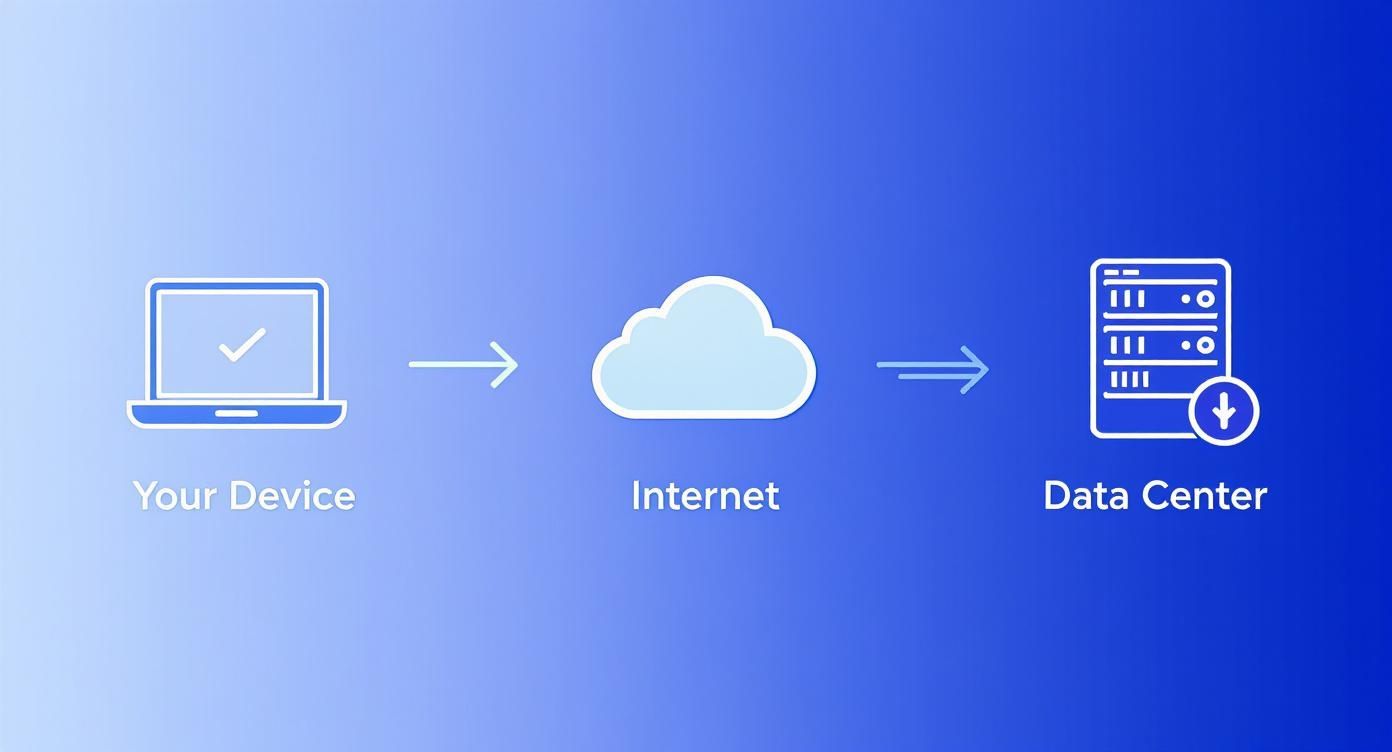
Only after all these encrypted packets arrive safely at the provider’s data center are they unlocked and reassembled, perfectly recreating your original file. It’s now stored, secure, and ready for you to access from anywhere.
Uploading vs. Syncing: What's the Difference?
While they sound similar, it's important to know the difference between uploading and syncing. They serve very different purposes.
Uploading: Think of this as a one-way trip. You pick a file and send a copy to the cloud for safekeeping or sharing. It’s like mailing a physical photo to a friend—you still have the original, and they have a copy. If you edit your original photo later, the one you mailed doesn't change. You'd have to send a new one.
Syncing: This is a continuous, two-way street. When you use a service like Dropbox or Google Drive, you're creating a special folder that acts as a magic mirror. Any change you make on one device—adding, editing, or deleting a file—is instantly reflected in the cloud and then updated across all your other linked devices.
Syncing is what makes cloud storage feel so seamless. It’s the engine that ensures the presentation you polished on your laptop is the exact same version you pull up on your tablet moments later in a meeting, with zero extra effort on your part.
How Your Data Stays Safe in the Cloud
The idea of storing your important files on someone else's computer network can feel a bit nerve-wracking. But cloud services are built from the ground up with security in mind, relying on two key pillars to protect your data from both digital snoops and physical disasters: encryption and redundancy.
Let's start with encryption. The simplest way to think about it is as a digital lockbox. When you upload a file, it's scrambled into unreadable nonsense using a complex mathematical key. Only someone with the right key (you and your provider) can unlock it.
This process happens at two critical stages:
- Encryption in Transit: This protects your data as it travels across the internet from your computer to the cloud server. It’s like sending your file through a secure, armored tunnel, preventing anyone from intercepting it along the way.
- Encryption at Rest: Once your file arrives, it stays scrambled on the provider's hard drives. If a thief managed to physically steal a server, all they’d find is a jumble of useless data they couldn't possibly read.
Beyond Encryption With Redundancy
While encryption is all about keeping your files secret, redundancy is about keeping them safe. This is the cloud’s brilliant defense against data loss.
The concept is simple but incredibly effective: your provider doesn’t just keep one copy of your data. Instead, it creates multiple identical copies and spreads them across different servers, and sometimes even across different data centers in entirely different parts of the world.
This strategy means there is no single point of failure. If one server crashes, another one seamlessly takes over. If an entire data center gets hit by a hurricane or a power outage, your files are still safe and sound at another location, ready for you to access.
This powerful combination of security and reliability is why the global stand-alone cloud storage market was valued at a massive USD 22.67 billion in 2024 and is expected to soar to USD 71.94 billion by 2034. You can track trends like this in our latest tech news coverage.
From massive corporations to individual users, everyone relies on this system for backups and disaster recovery. If you want to dive deeper, you can read more about the projections for cloud storage growth. Ultimately, it's this dual approach—digital scrambling and physical duplication—that makes the cloud such a resilient place for your data.
Accessing and Sharing Files From Anywhere

The real magic of cloud storage is that your files are no longer stuck on one computer. Instead, they live online, ready for you whenever and wherever you need them. This universal access is what sets it apart from a traditional hard drive.
Every time you log in, your device sends a secure request to the provider's servers. After confirming it's really you, the server streams the files you need right to your screen. This gives you instant access without having to download your entire digital life every single time.
Your Gateways to the Cloud
You generally have three ways to get to your cloud files, each suited for different situations:
- Web Browsers: This is the go-to method for accessing your stuff from any computer, anywhere. Just log in to the provider's website. It's perfect for when you're using a friend's laptop or a public computer.
- Desktop Apps: When you install the dedicated app from services like Dropbox or Google Drive, the cloud feels like just another folder on your computer. It makes automatic syncing completely seamless.
- Mobile Apps: These apps put all your files in your pocket. They’re built for on-the-go tasks, whether you need to quickly review a document, share a photo, or upload a video from your phone.
The best part is how these all work together. A file you drop into your desktop folder is instantly available on your phone's app. It’s one consistent, up-to-date experience across all your gear.
Sharing Files With Precision and Control
Cloud storage also completely changes how we share files. Gone are the days of emailing bulky attachments that clog up inboxes. Now, you just generate a secure link that points to the file or folder living in your cloud account.
When you share a file, you aren't sending a copy. You're granting controlled access to the single, centralized version. This is a game-changer for collaboration because it means everyone is always looking at the latest draft.
This system gives you fine-grained control over who can do what with your data. For every link you create, you can set specific permissions, which is crucial for teamwork. Most services offer at least two core permission levels:
- Viewer: The person can open and see the file, but they can't change a thing.
- Editor: This level grants full permission to modify, add, or even delete the content within that file or folder.
This level of control makes sharing both simple and secure, whether you're sending vacation photos to family or co-authoring a critical business report with your team.
Choosing the Right Cloud Storage Provider
With so many cloud storage services out there, all competing for your files, picking the right one can feel like a real chore. But it doesn't have to be.
The secret is to start by understanding your own needs. Are you just trying to back up family photos and important documents? Or are you a creative professional who needs to stash away massive video files? Answering that one question is the first step to making a great choice. It helps you focus on what really matters: storage space, cost, security, and how easily the service fits into your digital life.
Comparing Key Factors
When you start digging into the options, it's easy to get lost in the weeds. I've found it's best to zero in on a few core areas that will make or break your experience.
Storage Capacity and Pricing: Almost every provider gives you a little bit of free space to get started. This is perfect for taking a service for a test drive. From there, paid plans usually offer a lot more storage for a monthly or annual fee. It’s all about finding that sweet spot between how much space you truly need and what you're comfortable spending.
Security and Privacy: All the big names in cloud storage use strong encryption, but some go a step further. Look for features like zero-knowledge encryption, which means that not even the company's employees can see what you’ve stored. How much you value that extra layer of privacy is a huge factor.
Integration and Ease of Use: The best cloud storage service is the one you barely notice because it just works. Think about how well it plays with the devices and apps you use every day. If you're all-in on Apple, iCloud is a natural fit. If you live inside Microsoft Office or Google Workspace, then OneDrive and Google Drive have a home-field advantage.
This is a massive market, and it's growing because people are finding more and more ways to use it. The global consumer cloud storage market is projected to hit USD 134.81 billion by 2035. Interestingly, the most popular plans are those in the 50 GB to 999 GB range, which tells you that most of us want a good chunk of space without paying a fortune. You can see more details in this market analysis on consumer cloud storage trends.
A Quick Comparison of Popular Cloud Providers
To give you a head start, here’s a simple breakdown of some of the most popular options on the market. This isn't an exhaustive list, but it covers the major players and what they do best.
| Provider | Free Storage Included | Key Strengths | Ideal For |
|---|---|---|---|
| Google Drive | 15 GB | Excellent collaboration tools; deep integration with Google Workspace. | Students, teams, and anyone heavily invested in the Google ecosystem. |
| Microsoft OneDrive | 5 GB | Seamless integration with Windows and Microsoft 365 (Office). | Professionals, students, and businesses using Microsoft software. |
| Dropbox | 2 GB | Simple, reliable syncing; excellent for sharing files with anyone. | Individuals and teams who need rock-solid file sharing and syncing. |
| Apple iCloud | 5 GB | Perfect integration with Apple devices (iPhone, iPad, Mac). | Apple users who want to back up their devices and sync photos. |
Think of this table as a starting point. Your specific needs for collaboration, device integration, or sheer storage space will ultimately guide your final decision.
Making Your Final Decision
At the end of the day, there is no single "best" provider—only the one that’s best for you. I always recommend taking advantage of the free trials. Get a feel for the app, upload a few files, and see which interface you actually enjoy using.
Don't just look at the gigabytes; consider the user experience. A service that feels intuitive and makes syncing and sharing effortless will provide far more value than one that’s clumsy to use, regardless of how much storage it offers.
For example, a student might be perfectly happy with a service that has a generous free plan and great document collaboration tools. A photographer, on the other hand, will probably need to jump straight to a paid plan with terabytes of storage and features designed for managing huge photo libraries.
Taking a moment to match a provider's strengths with what you actually do every day will ensure you pick a service you’ll be happy with for years to come. If you want to dive deeper, you can also check out some of the other tech guides from our experts who regularly review these services.
Common Questions About Cloud Storage
Even after you get the hang of how cloud storage works, a few practical questions almost always pop up. Let's run through some of the most common ones so you can feel totally comfortable with your files in the cloud.
The biggest one is usually about privacy. Who can see my stuff? Reputable providers use strong encryption, which essentially scrambles your files into unreadable code for anyone who doesn't have your password. Still, it’s always smart to skim a provider’s privacy policy to see exactly how they handle your data. You can learn more about our own approach to straightforward tech explanations on our about us page.
What Happens if a Server Crashes?
This is another huge concern. What if the machine holding my photos just… breaks? It's a fair question, but it’s also something you rarely have to worry about. Cloud systems are built for this.
They rely on a powerful concept called redundancy. This just means they never, ever keep only one copy of your file.
Your data is automatically duplicated across multiple servers. Often, these servers are in completely different buildings or even cities. If one machine fails, another one seamlessly steps in. You’d likely never even notice.
This distributed, multi-copy strategy is the secret sauce that makes cloud storage so durable.
Managing Payments and Account Status
Okay, what about a more down-to-earth problem: what happens if I miss a payment? Will all my files vanish overnight?
Thankfully, no. Most services have a grace period. Your account will likely be frozen—you’ll still be able to see and download everything you’ve already stored, but you won't be able to upload anything new. They give you some time to sort out the payment.
Of course, if you let it go for too long, they will eventually delete your data based on their terms of service. It's always best to keep your account in good standing.
At Simply Tech Today, we break down complex topics into simple, practical guides. Visit us to learn more about the technology you use every day.


Member discussion