
How to Use AI Tools for Smarter Work

Dipping your toes into the world of AI can feel like a huge undertaking, but it’s actually much more straightforward than it sounds. The best way to start? Don't try to boil the ocean. Just find one small, repetitive task you do every day—like summarizing meeting notes or drafting follow-up emails—and find a simple tool to help.
Your Quick Start Guide to AI Tools
When people hear "artificial intelligence," their minds often jump to complex code or sci-fi robots. The reality is much more practical. Modern AI tools are built to be your personal assistant, your creative co-pilot, or just a handy sidekick that handles the tedious stuff. They’re not here to take over your job, but to free you up to do the parts you do best.
If you’re curious about what’s happening under the hood, our guide explains how artificial intelligence works in plain English.
Businesses everywhere are catching on fast. In 2023, around 55% of companies were already using AI in some capacity. Fast forward to 2024, and that number has jumped to 72%, a clear sign that AI has moved from a niche technology to a mainstream business tool. You can read more about these AI adoption statistics to see the full picture.
Finding Your First AI Tool
You don’t need an elaborate plan to get started. The easiest way to learn is by doing. Just think about your day-to-day work and find a small annoyance you'd love to get rid of.
Writing and Communication: Are you constantly staring at a blank page, trying to brainstorm ideas, or spending too much time tweaking your grammar? An AI text generator or writing assistant can be a game-changer.
Creative and Visuals: Ever needed a quick image for a presentation but have zero design skills? AI image generators can spin up a graphic from a simple sentence.
Organization and Summarization: Drowning in long reports, articles, or meeting transcripts? An AI summarizer can pull out the key points for you in just a few seconds.
The goal isn't to become an AI expert overnight. It's about finding one tool that saves you 15 minutes a day. Those small wins are what build the confidence to tackle bigger things later on.
The good news is that many of the best tools are designed for absolute beginners, with simple interfaces that hide all the complexity. To help you connect your problem with the right solution, here's a quick guide to get you started.
Your First AI Tool Quick Guide
This table is a simple cheat sheet to help you match a common task with the right type of AI tool and a solid, beginner-friendly option to try out.
| Your Goal | Type of AI Tool | Beginner-Friendly Option |
|---|---|---|
| Draft emails or blog posts | AI Text Generator | ChatGPT, Jasper |
| Create unique images | AI Image Generator | Midjourney, DALL-E 3 |
| Summarize long articles | AI Summarizer | QuillBot, Notion AI |
| Improve grammar and clarity | AI Writing Assistant | Grammarly, Hemingway Editor |
Think of these as your starting lineup. Pick one that solves a real problem for you, spend a little time playing with it, and you'll quickly see what all the fuss is about.
Choosing the Right AI Tool for Your Work
Walking into the world of AI can feel a bit like trying to pick a single restaurant in a city with thousands of options. It's overwhelming. With new tools popping up what feels like every single day, how do you even start?
Here’s the secret: stop looking for the "best" AI tool. Instead, focus on finding the right tool for your specific problem right now.
Forget the hype for a minute and think about your actual goal. Are you trying to get a head start on marketing emails? Maybe you need a unique image for a presentation, or you're tired of manually sorting through customer feedback in a spreadsheet. The quickest way to get value from AI is to start with a real, tangible task you need to get done.
What’s Your Biggest Time-Waster?
Before you open a single new browser tab, ask yourself one simple question: what’s the one thing in my workday that eats up way too much time? That's your starting point. Don't fall into the trap of looking for a single magic wand that does everything. Just find one thing to fix.
This little bit of focus instantly clears away 90% of the noise. The flowchart below is a great way to visualize this simple decision.
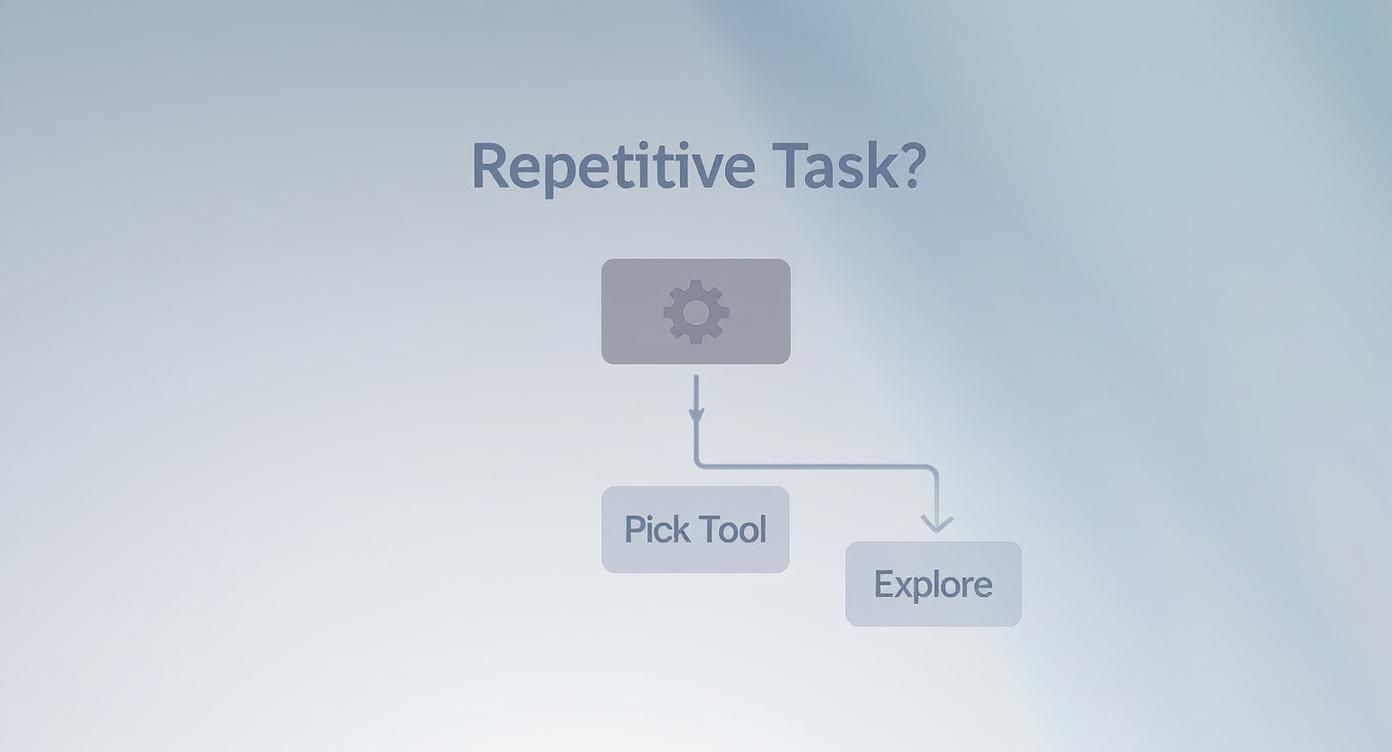
As you can see, if the task is repetitive, you're looking for an automation tool. If not, you're free to explore more creative or analytical options. Simple as that.
Once you’ve got a goal in mind, a few practical questions will help you narrow the field even further. Does the tool need to play nice with software you already use, like Google Docs or Slack? What’s your budget? How much time are you really willing to spend learning something new?
Answering these questions turns a random hunt into a focused mission. A powerful, complex platform is completely useless if it takes you weeks to figure out and messes up your existing workflow.
Key Factors for Picking Your Tool
With a clear goal, you can start weighing your options against a few core criteria. This isn't about finding a perfect tool, but a practical one you'll actually use.
- How easy is it to use? Look for something with a clean interface that makes sense to you. If you can’t get the hang of it in the first 15 minutes, it’s probably not the one. Most good tools offer a free trial—take them for a spin.
- Does it do the one thing you need really well? A general-purpose AI chatbot is a great jack-of-all-trades, but a specialized tool—like an AI presentation maker or an image background remover—will almost always give you a better result for that one specific job.
- What's the real cost? Is the free version good enough, or will you need to pay? Keep an eye on the pricing model. Some charge a flat monthly fee, while others use a credit system that can get surprisingly expensive if you use it a lot.
- Will it connect with your other software? The best tools don't live on an island. Check if it integrates with your project management app, email client, or cloud storage. A smooth workflow is a happy workflow.
I see this all the time: people choose a tool just because it's popular. But the right AI for a massive corporate marketing department is probably massive overkill for a freelancer who just wants to write blog posts a little faster.
To help you get started, here's a quick comparison of some popular options across different categories. This isn't an exhaustive list, but it gives you a good feel for what's out there.
Feature Comparison of Popular AI Tools
| AI Tool | Best For | Key Feature | Pricing Model |
|---|---|---|---|
| ChatGPT | General-purpose writing, brainstorming, and coding help. | Versatile conversational interface that can handle a huge range of tasks. | Freemium with a paid "Plus" tier for advanced features. |
| Jasper | High-volume marketing content creation and copywriting. | Brand Voice and specific templates for SEO, ads, and social media. | Subscription-based, tiered by features and word count. |
| Midjourney | Creating high-quality, artistic, and stylized AI images. | Advanced image generation with a distinct, artistic style. | Subscription-based, accessed through the Discord platform. |
| Fireflies.ai | Automating meeting notes and summarizing calls. | Transcribes and summarizes meetings from platforms like Zoom and Google Meet. | Freemium with paid tiers for more storage and features. |
This table should give you a solid starting point for finding a tool that fits your specific needs without overwhelming you with options.
This approach isn't just about making your own life easier; it’s about keeping up with how work is changing. The effect of AI on productivity is hard to ignore. By 2035, it’s estimated that AI could boost labor productivity by 37% in Sweden and 35% in the United States. While some jobs will change, new ones will appear, making AI skills incredibly valuable. You can read more about how AI is evolving the workforce to get a bigger picture.
Making a smart choice upfront is the first real step to using AI well. If you can tune out the noise and focus on your actual needs, you’re setting yourself up for success from day one.
Mastering the Art of the AI Prompt
Getting fantastic results from an AI tool has very little to do with the tool itself—it’s all about how you talk to it. Think of the AI as an incredibly smart and lightning-fast intern who takes everything you say literally. Give it vague instructions, and you'll get a vague, unhelpful response. This is why mastering the art of the prompt is the single most important skill you can develop.
A "prompt" is just the set of instructions you give the AI. Learning to write a good one, often called prompt engineering, is the difference between getting a generic, useless paragraph and a perfectly crafted piece of content that saves you hours. It’s a core skill, much like how understanding the basics is crucial for anyone new to machine learning for beginners.
That simple text box is your command center. What you type there directly dictates the quality of what you get back.
From Weak Questions to Powerful Instructions
Most people start by asking an AI a simple question, just like they would with a search engine. This is the biggest mistake I see, and it’s why so many people get frustrated and give up. An AI is not just a search tool; it's a creation engine.
Let’s walk through a real-world scenario. You're a project manager, and it's time to send the weekly update email to your team.
A Weak Prompt: "Write a project update."
This is way too simple. The AI has no clue what the project is, who the email is for, or what information actually matters. The result will be a generic, unusable template you'll have to rewrite from scratch.
Now, let's give that same request some much-needed detail and structure.
A Powerful Prompt: "Act as a project manager for a software development project called 'Phoenix.' Draft a weekly update email for the internal development team. Your tone should be informative but encouraging. Mention that we successfully completed the user authentication feature but are slightly behind on the payment gateway integration. Keep it under 200 words and include a clear call-to-action asking team members to update their task statuses by end of day."
Night and day, right? By providing context, a role, a tone, constraints, and a specific goal, you're guiding the AI to produce something that’s 90% of the way there. All you need to do is give it a quick polish and hit send.
The Key Ingredients of a Great Prompt
A powerful prompt isn't about writing a novel; it's about being strategically specific. The best prompts I've ever written almost always contain a mix of a few key ingredients that give the AI clear guardrails.
Here's what works for me:
- Role and Persona: Tell the AI who to be. "Act as a professional copywriter," "You are a friendly customer support agent," or "Pretend you are a seasoned travel blogger." This one trick instantly shapes the AI's tone, vocabulary, and style.
- Context: Give the AI the backstory. Who is this for? What's the goal? What key information does it need to know?
- Task and Format: Be explicit about what you want it to do. "Create a bulleted list of..." or "Write a three-paragraph blog intro..." or "Generate a table comparing these three options..." The more specific you are about the format, the less cleanup you have to do later.
- Constraints: Set clear boundaries. Things like "keep it under 150 words," "use simple language," or "avoid technical jargon" are your best friends. Constraints stop the AI from rambling and keep the output tightly focused.
Weaving these elements together transforms your interactions with AI from a guessing game into a predictable, repeatable process. It's how you get consistently great results every single time.
For instance, instead of asking an AI to "write about social media," you could prompt it: "Act as a social media strategist. Create a list of 5 engaging Instagram post ideas for a small, local coffee shop. The audience is college students. The tone should be casual and witty."
This level of detail is what unlocks what these tools are truly capable of. You shift from being a passive user asking questions to a director, guiding the AI to create exactly what you have in your head. This skill is your gateway from simply playing with AI to truly integrating it into your daily work.
Weaving AI Into Your Daily Workflow
Knowing how to write a good prompt is a great start, but the real power comes when using AI tools feels as natural as checking your email. The goal is to stop thinking of AI as a special event and start weaving it into the fabric of your everyday tasks. This isn't about a massive, disruptive change. It's about building small, consistent habits that pay off with huge time savings down the road.
Think about all those repetitive, low-impact tasks that seem to eat up your day. Those are the perfect places to start. By tackling the small stuff first, you can build momentum without feeling overwhelmed.

For example, a project manager could make it a habit to feed meeting transcripts into an AI summarizer at the end of each day. In five minutes, they get a clean list of key takeaways and action items. That simple habit easily saves an hour of sifting through notes and ensures nothing important gets missed. The trick is to spot a recurring pain point and assign an AI tool to fix it.
Building Repeatable AI Habits
The secret to making AI stick is to create simple, repeatable processes you can lean on without much thought. Don't treat it like a fancy tool you only pull out for big projects; think of it as a utility, just like your calendar.
Here are a few practical ways different people can build these habits:
For the Marketer: At the start of the week, drop your content calendar topics into an AI tool and ask it to brainstorm a dozen social media post ideas. Now you have a creative well to draw from all week long.
For the Student: After a lecture, upload your notes or audio recording to an AI. Ask it to generate a study guide complete with key concepts, definitions, and practice quiz questions.
For the Sales Rep: Let an AI writing assistant draft your personalized follow-up emails. Create a solid master prompt with your preferred tone and talking points, then just plug in the client's details for each new message.
These aren't complex automations. They're just simple, powerful habits that become incredibly effective when done consistently.
The best way I've found to make AI a regular part of my day is to create a "trigger-action" habit. The trigger is the routine task (like a meeting ending), and the action is firing up the AI tool to process it. This removes the mental load of deciding when and how to use AI.
Connecting Your Tools for Greater Impact
Once you get comfortable using individual tools, the next level is getting them to talk to each other. This is where you can start building a truly personal productivity system. And you don't need to be a developer to make it happen; many modern apps are built to connect.
For instance, you could create a workflow where one AI tool automatically transcribes a sales call recording. A second tool could then summarize that transcript into action items, and a third could draft a follow-up email based on the summary. You can set this up with platforms like Zapier or even just by copy-pasting the output from one app to the next. Keeping all this information organized is also important, so understanding how cloud storage works can help you build a much more efficient system.
A Sample Integrated Workflow
Let's see what this looks like in practice. Here's a straightforward content creation workflow that chains three different tools together to get from idea to a published draft much faster.
- Idea Generation in Notion AI: It all starts in a Notion database where you brainstorm blog topics. You can use Notion's built-in AI to take a single idea and expand it into a full outline with H2 and H3 headings.
- Drafting in Jasper: With a solid outline in hand, copy and paste it into a specialized writing tool like Jasper. You can then instruct Jasper to write each section, using your outline as its guide.
- Polishing with Grammarly: Finally, take the raw draft from Jasper and run it through Grammarly. This last step catches any spelling mistakes, cleans up the grammar, and helps refine the overall tone and clarity.
This kind of approach turns AI from a simple assistant into a core part of your creative engine. By building these small habits and simple workflows, you’ll naturally find more and more ways for AI to make your work life easier.
How to Use AI Safely and Ethically
Getting the most out of AI tools means you also have to be smart about how you use them. This isn't about being scared of the technology—it's about being aware of the ground rules for privacy, accuracy, and creating original work.
Think of it this way: the first rule of AI is you don't talk about sensitive stuff. Never paste confidential information into a public chatbot unless you know exactly how that data is handled. Many of these tools learn from your conversations, which means your private details could end up in their digital brain.
Guard Your Private Information
Your data is currency. When you start using a new AI tool, you’re making a trade, even if you don't realize it. It’s absolutely critical to be mindful of what you're sharing, especially with the free tools anyone can access.
You wouldn't shout your company's secret strategy in a crowded cafe, right? Treat public AI tools with that same level of caution.
Here are a few simple habits to build:
- Scrub Personal Details: Keep names, addresses, phone numbers, and other personally identifiable information (PII) out of your prompts.
- Anonymize Your Data: If you need the AI to analyze something from work, generalize it. Instead of real names, use placeholders like "Client A" or "Project Manager."
- Check the Privacy Policy: Before you get too deep with a new tool, spend five minutes reading its privacy policy. Look for phrases like "data used for training purposes" to see if your conversations are being logged and reviewed.
The biggest risk with AI isn't a robot uprising; it's human error. If you act like every prompt you write could be read by someone else, you'll be in good shape.
Fact-Check Everything The AI Tells You
AI models are built to sound confident, not to be right. They can create sentences that seem completely factual but are actually nonsense. This phenomenon is called a "hallucination," and it’s why you have to double-check everything.
For instance, if you ask for a specific statistic or a historical date, an AI might just invent a plausible-sounding answer. Before you drop that "fact" into a report or presentation, you have to verify it with a trusted, primary source. Relying on unverified AI output is a quick way to damage your credibility.
This web of connected, data-sharing devices also raises important security questions, a topic we explore in our article on what is the Internet of Things.
Know the Line Between Originality and Plagiarism
At the end of the day, AI is a partner, not a replacement for your own brain. While it's tempting to have an AI write an entire report for you, passing off its work as your own is a major ethical red flag, especially at school or in the office.
The best way to work with AI is to use it for the heavy lifting—brainstorming ideas, creating outlines, or getting a rough first draft on the page. From there, it's your job to add your unique expertise, your voice, and your analysis. That human touch is what makes the work valuable and, more importantly, makes it yours.
Treat the AI like a very smart assistant, not a ghostwriter.
Common Questions About Using AI Tools
As you start exploring what AI tools can do, it's natural to have a lot of questions. From sidestepping common rookie mistakes to figuring out workplace rules, a little guidance can go a long way. Let's dig into some of the most frequent questions people have when they first jump in.
And a lot of people are jumping in. Consumer AI use has exploded, becoming a daily habit for hundreds of millions. By 2025, it's estimated that 1.7 to 1.8 billion people worldwide will have used an AI tool, with up to 600 million using one every single day. With a staggering 84.58% of users saying they've used AI more over the past year, it’s clear these tools are here to stay. You can find more of these insights in a report on the state of consumer AI on menlovc.com.
What Are the Biggest Mistakes Beginners Make?
It's easy to get frustrated when you first start. Many newcomers find their results feel generic or flat-out unhelpful, but this is usually because of a few simple mistakes that are easy to fix once you know what they are.
The single biggest error? Vague prompts. Asking an AI to "write a blog post" with zero context is like telling a chef to "make food." Sure, you'll get something, but it's probably not what you had in mind.
Another huge pitfall is trusting the AI's output without a second thought. These models can state completely wrong information with unshakable confidence. Always, always treat AI-generated facts, figures, or any critical details as a first draft that needs a human to verify it.
Here are the top three mistakes to watch out for:
- Vague Instructions: Not giving the AI enough background, a clear goal, or specific things to avoid.
- Assuming Accuracy: Taking every word as gospel without checking it against reliable sources.
- Using the Wrong Tool: Trying to make a general chatbot do something specialized, like detailed photo editing, when there's a dedicated tool built just for that.
The best advice I can give is to frame your prompts using a simple "context-role-task" model. Give it the background info (context), tell it who to be (role), and then be crystal clear about what you need it to do (task). This little shift in how you ask makes a world of difference.
Can I Use AI at Work Without Telling My Boss?
This one is tricky, and the answer really boils down to your company's culture and official policies. Using AI to be more productive is a great goal, but keeping it a secret can open up some serious risks for both you and your employer.
First things first: check for a company policy on AI. Many organizations have already put clear guidelines in place. If there's a policy, you have to follow it, no exceptions.
If there isn't a formal policy, being transparent is still your safest bet. The number one concern for most businesses is data security. Pasting sensitive company information into a public AI tool is a massive security breach. That data could be stored on someone else's servers indefinitely. For a refresher, our guide on how to use cloud storage covers some good principles for managing data safely.
My suggestion? Frame your AI use as a way to assist your work, not replace it. Show your manager how a tool helps you summarize meeting notes faster or draft emails more efficiently. This paints you as a proactive employee who's using modern tools to do your job better.
How Do I Know if Content Was Made by an AI?
Telling AI-generated content apart from human writing is getting harder by the day, but there are still a few subtle clues you can look for. AI text often feels a little too perfect and polished, missing the unique voice and quirks that a person naturally brings to their writing.
Repetitive phrasing is another dead giveaway. AI models can get stuck on certain sentence structures or transition words, which makes the writing feel robotic and monotonous. You might also notice a generic tone that's missing any real personality, stories, or genuine emotion.
But the conversation is changing. Instead of just focusing on detection, the more important question is whether the content is valuable, accurate, and useful, regardless of who—or what—created it.
Here are a few things that might indicate AI-generated text:
- Perfectly generic language with no distinct personality.
- Weird repetition of certain words or sentence patterns.
- A lack of personal stories, opinions, or unique insights.
- Occasional factual errors or "hallucinations" stated as fact.
Ultimately, your goal shouldn't just be to "catch" the AI. It's to make sure that any content, whether it's from a human, an AI, or a collaboration between the two, meets a high standard. Your judgment, expertise, and voice are what make any piece of work truly valuable.
At Simply Tech Today, we believe that understanding technology empowers you to make smarter choices. Explore our blog for more straightforward guides and practical tips.
Member discussion