
How to Use Time Blocking: Plan, Protect and Adjust

You open your laptop with a clear priority, answer a message before getting started, and discover your morning has filled with other people's requests. Your task list still looks reasonable. Your remaining time doesn't.
Learning how to use time blocking starts with treating your calendar as a capacity limit, not a wish list. Give important work a defined place, account for the less interesting work around it, and adjust the plan when reality disagrees. The useful question isn't whether you followed every appointment perfectly. It's whether you made deliberate choices about what would fit.
A Sample Workday Built From Time Blocks
The method is old: Owaves' account of Benjamin Franklin's daily routine describes his 1733 timetable, which assigned activities to specific periods, including two four-hour work blocks.
For a modern example, say your workday starts at 8:30 a.m., your strongest concentration comes early, and you have an afternoon meeting. This hypothetical schedule gives demanding work a place before routine obligations take over.
| Time | Block | Planned work |
|---|---|---|
| 8:30–10:00 | Deep work | Draft the proposal's recommendation |
| 10:00–10:10 | Buffer | Save notes and prepare the next task |
| 10:10–10:40 | Shallow admin | Process invoices and file receipts |
| 10:40–10:50 | Buffer | Handle an overrun or transition |
| 10:50–11:20 | Communication | Answer email and messages |
| 11:20–11:30 | Buffer | Close conversations and gather materials |
| 11:30–12:30 | Deep work | Solve the proposal's technical question |
| 12:30–1:15 | Lunch and break | Eat, walk, and step away |
| 1:15–2:00 | Flexible capacity | Prepare for the meeting or absorb unexpected work |
| 2:00–2:30 | Meeting | Resolve questions with collaborators |
| 2:30–2:45 | Buffer | Record decisions and follow-up tasks |
| 2:45–3:00 | Break | Rest away from the screen |
| 3:00–3:30 | Communication | Send follow-ups and clear replies |
| 3:30–3:45 | Buffer | Finish transitions |
| 3:45–4:00 | Review | Record progress and place unfinished work |
Match the block to the work
Use these illustrative starting lengths, not universal prescriptions. The energy windows assume you concentrate best in the morning; move them if your pattern differs.
| Block type | Typical length in this example | What goes in it | Best energy window |
|---|---|---|---|
| Deep work | 60–90 minutes | Writing, coding, problem solving | Morning, if that's when focus is highest |
| Shallow admin | 20–30 minutes | Invoices, expense reports, filing | Mid-morning or after lunch |
| Communication | 20–30 minutes | Email, messages, replies | Late morning and late afternoon |
| Buffer | 5–15 minutes | Transitions, overruns, quick questions | Between activity blocks |
| Break | 10–20 minutes | Walk, food, rest | Midday and mid-afternoon |
| Review | 10–15 minutes | Checking the day, moving unfinished work | End of day |
For help identifying suitable windows, Jan Kutschera explains how to plan around your energy peaks. Don't copy a morning-heavy calendar if you're alert later.
A student might start with a shorter study window; a nurse might reserve handover time where clinical responsibilities allow. For a self-directed workday, I'd protect a deep-work period, an admin window, and a closing review before adding anything elaborate.
If sustained focus feels difficult, use the Pomodoro technique inside a block, rather than treating every timer interval as a separate calendar appointment.
Right-size test: At the end of a block, you've either finished the task or recorded exactly where you stopped.
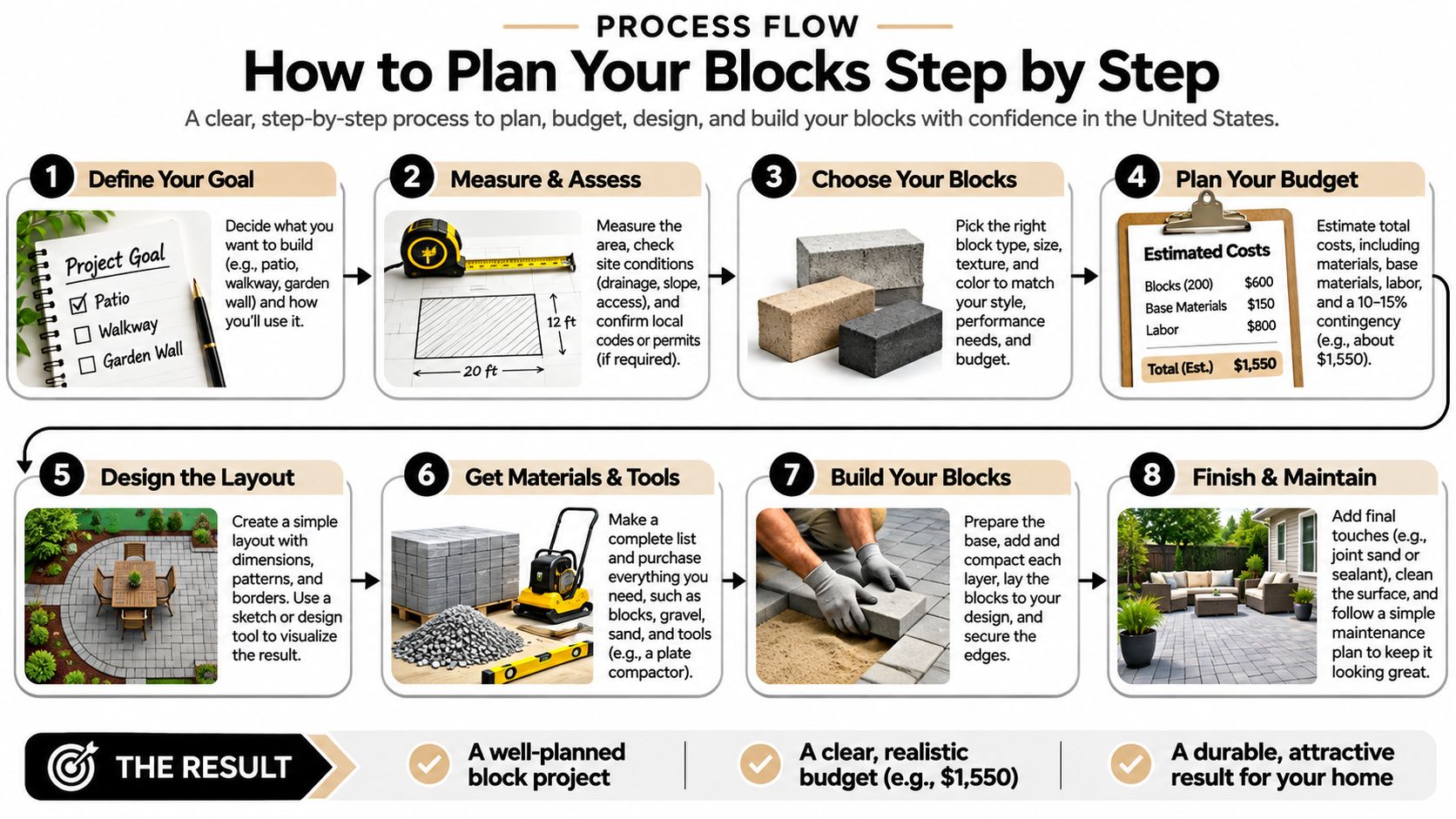
How to Plan Your Blocks Step by Step
Build tomorrow's schedule from your actual commitments, not an idealized empty calendar. Put classes, meetings, travel, and personal obligations in place before assigning discretionary work.
The useful mechanism is implementation intention: specifying when, where, and how you'll act. An Aftertone evidence review cites a meta-analysis of 94 studies reporting a medium-to-large average effect on goal attainment, d = 0.65, but that doesn't establish a universally superior time-blocking format.
Build a schedule you can start
List the work and estimate its size. Gather tasks from your notebook, inbox, assignments, and project app into a working list, including preparation and follow-up. Mark unfamiliar work as uncertain rather than disguising a guess as a dependable estimate.
Choose your highest-value tasks. In a hypothetical plan, select three priorities, then give the most demanding one the first available deep-work block before opening email. Treat the others as a priority queue, not a promise that several substantial tasks will fit inside the same appointment.
Assign a start and an end. Place each selected task into the space remaining around fixed commitments, with a visible stopping point. A task assigned only to Tuesday still competes with everything else on Tuesday; an actual appointment forces you to decide what it displaces.
Write the context and first action. For example, your calendar entry might say: at the kitchen table after breakfast, open the report outline and draft the recommendation paragraph. This removes the small but consequential decision about where to begin, especially when the project name alone feels overwhelming.
Group administrative work and replies. Give invoices, filing, and routine messages their own windows rather than inserting them whenever demanding work gets uncomfortable. Keep the categories distinct when they require different systems, but combine them if separate appointments would add needless overhead.
Add transition space. Leave room to save files, collect materials, use the bathroom, or finish a conversation before switching categories. If the plan fits only when every transition takes no time, remove or narrow a task instead of hoping you'll move faster.
Close with an explicit review. Mark what finished, record the next action for unfinished work, and place it into a specific future opening. When tomorrow is already full, choose what to defer or renegotiate rather than adding another obligation.
Keep the entry useful, not elaborate
A good block title names an action and links to its working material. In Google Calendar, that might mean a drafting appointment with the Google Docs outline attached; on paper, write the relevant notebook page beside the task.
For coursework, use a study schedule template to position classes and deadlines before adding independent study. If you work on a tablet, Tinymoose's iPad-friendly study planning guide offers a useful companion for organizing the study routine.
Don't spend your planning session decorating labels while leaving the work undefined. A plain appointment with a clear first action beats a beautifully categorized project name.
Choose a Tool That Matches Your Routine
| Tool type | Best for | Main drawback | Setup time |
|---|---|---|---|
| Digital calendar | Meetings and shared schedules | Easy to overfill when every gap looks free | Add fixed commitments, availability, and focus holds |
| Paper planner | Students and personal routines | No automatic reminders | Draw the week and enter immovable commitments |
| Task app with calendar view | Keeping task lists and blocks together | Two places to update when plans change | Connect the calendar and test rescheduling |
| Timer app | Running focus sessions inside a block | Does not plan the day | Choose a session preset and notification settings |
Setup time is best judged by these tasks, not a universal minute estimate. A calendar with existing meetings needs different preparation from a new planner with no commitments entered.

Choose for the schedule you actually have
A hybrid worker with frequent meetings should usually start with the shared calendar colleagues already consult, such as Outlook or Google Calendar. Mark protected work as busy when appropriate, but keep sensitive project details out of broadly visible titles. A private planner won't help coworkers understand your availability.
A student with a shifting timetable may prefer a weekly paper page. It offers room to sketch study periods around changing classes without configuring another app. The trade-off is manual maintenance: when a seminar moves, you must update the page yourself.
Someone managing many project tasks may prefer a task app with a calendar view. Test whether moving a block also updates the underlying task, whether unfinished work stays visible, and whether calendar changes synchronize in the direction you expect. Don't assume that a calendar integration means every field stays aligned.
Anyone struggling to begin or stop can pair their planner with a timer, such as a phone's built-in Clock app. The planner decides what you'll do; the timer marks the session boundary. A timer alone can help you work intently on something that wasn't important enough to schedule.
Keep a single schedule of record
Use the productivity app comparison to narrow your options, then choose where the authoritative schedule lives. Supporting tools should point toward that schedule, not maintain competing versions of it.
For example, keep appointments in Outlook, supporting files in their project folders, and a timer on your phone. You don't need every function inside the same application, but you do need to know which screen to check when plans conflict.
Choose the tool you'll open every day. Changing tools mid-week means rebuilding the routine while you're still trying to learn it.
Protect Blocks From Interruptions and Switching
Some employees are interrupted or forced to switch tasks approximately every three minutes, according to UCLA Anderson's summary of workplace research. The same summary distinguishes traditional planning, which assumes the day will proceed as expected, from contingent planning, which prepares responses to disruptions.
Traditional time management was associated with stronger engagement and productivity mainly when interruptions were limited. Contingent planning supported those outcomes whether interruptions were present or not. That distinction matters more than how neatly you color your calendar.
Prepare the response before the disruption
Reserve capacity for incoming work. Schedule less than your theoretical maximum and leave flexible space for legitimate requests. If your role includes customer escalations or operational support, protect shorter focus periods and coordinate coverage rather than pretending you can disappear.
Define an interruption policy. Capture nonurgent requests in a list and handle them during communication time. Agree with coworkers on what warrants an immediate interruption, who can cover urgent issues, and which channel they should use.
Reduce avoidable switching. Batch routine email and messages, disable nonessential notifications, and close unrelated tabs before beginning demanding work. Keep buffers between categories so a late conversation doesn't automatically consume the next task's starting time.
For a practical starting point, Getting Results' productivity guidance recommends batching email and app-based administration into one or two short windows and adding 5–15-minute buffers between meetings or task categories. Treat those as adjustments to test, not permission to ignore responsibilities that require faster responses.
Apply an urgency test
Say you're studying in the library when a group chat asks you to format presentation slides. If the group doesn't need them immediately, capture the request, silence the thread, and reply during your planned communication window.
If a teammate is blocked from submitting the assignment, make a deliberate exception. Record where you stopped studying, address the dependency, and decide which remaining commitment must move. The difference is choosing the switch instead of responding automatically to every notification.
Use email-overload practices to separate routine correspondence from time-sensitive messages. When the problem is too much assigned work rather than too many alerts, Acheloa Wellness's prioritizing and delegation tactics can help you decide what requires your involvement.
Don't extend the workday to preserve an unrealistic calendar. If a block repeatedly fails, shrink its scope, move it to a more protectable period, or renegotiate the responsibility.
Plan Uncertain Work and Review Blocks Weekly
Say a student reaches the end of a chemistry block with half the problems unsolved. If the calendar promised a finished assignment, the session looks like a failure even when the student worked attentively throughout.
Replace that promise with an effort window and a stop rule. Mike Giannulis's time-blocking guide discusses this approach using 45 minutes of chemistry problem-solving followed by recording remaining questions, or 60 minutes of drafting followed by a restart note. Direct evidence for time blocking as a named method remains limited; specifying when to act isn't a guarantee of when complex work will finish.
Define what a successful window means
The following are example formats to test, not measured optimal durations. Their purpose is to make stopping useful rather than abrupt.
| Task type | Block format | Stop rule | Next-action note |
|---|---|---|---|
| Problem sets | 45-minute effort window | Stop when the window ends | List the unfinished question numbers |
| Essay or report drafting | 60-minute drafting block | Stop mid-section when the timer ends | Write the opening line of the next section |
| Coding bug | 60–90-minute debugging block | Stop after the window | Write the suspected cause and latest test result |
| Creative project | 30–45-minute sketch block | Stop after a finished idea, within the window | Name the next idea to try |
| Research reading | 30-minute reading block | Stop at the window's end after marking your place | Write a takeaway and an open question |
A stop rule doesn't cancel the deadline. It separates today's controlled effort from the larger completion commitment. If the remaining work threatens that commitment, schedule another window or change scope while there's still room to act.
For debugging, don't leave only a vague reminder to continue. Record the failing test, what you ruled out, and the next experiment. That makes restarting a concrete action rather than another round of reconstructing the problem.
Review against a log, not your memory
Run a trial week and record planned length, actual length, interruption count, and completion status for each block. A notebook or spreadsheet is sufficient; use the time-tracking software comparison if manual logging becomes cumbersome.
Classify overruns by cause:
- Underestimation: The task was clear and uninterrupted but needed more effort.
- Interruption: Other requests displaced the reserved work.
- Task ambiguity: Missing information or an undefined next action prevented progress.
At the weekly review, change only what the log supports. Reduce the scope of repeatedly unfinished blocks, add transition space where overruns cluster, and move admin windows that keep spilling into protected work. For ambiguous assignments, schedule investigation before promising completion.
Tomorrow, build a day from the sample using a tool you already understand. Give your hardest-to-estimate task an explicit stop rule, and record what happened before closing work.
Treat time blocks as adjustable capacity, not promises that uncertain work will finish on command.
Tech Today makes technology easy to understand, with simple, helpful explanations of apps, everyday tools, and developments in the tech world. Visit Simply Tech Today for practical guidance on choosing a planner, setting up focus tools, and building a scheduling routine you can maintain.


Member discussion