
Bandwidth vs Latency: What Matters Most in 2026
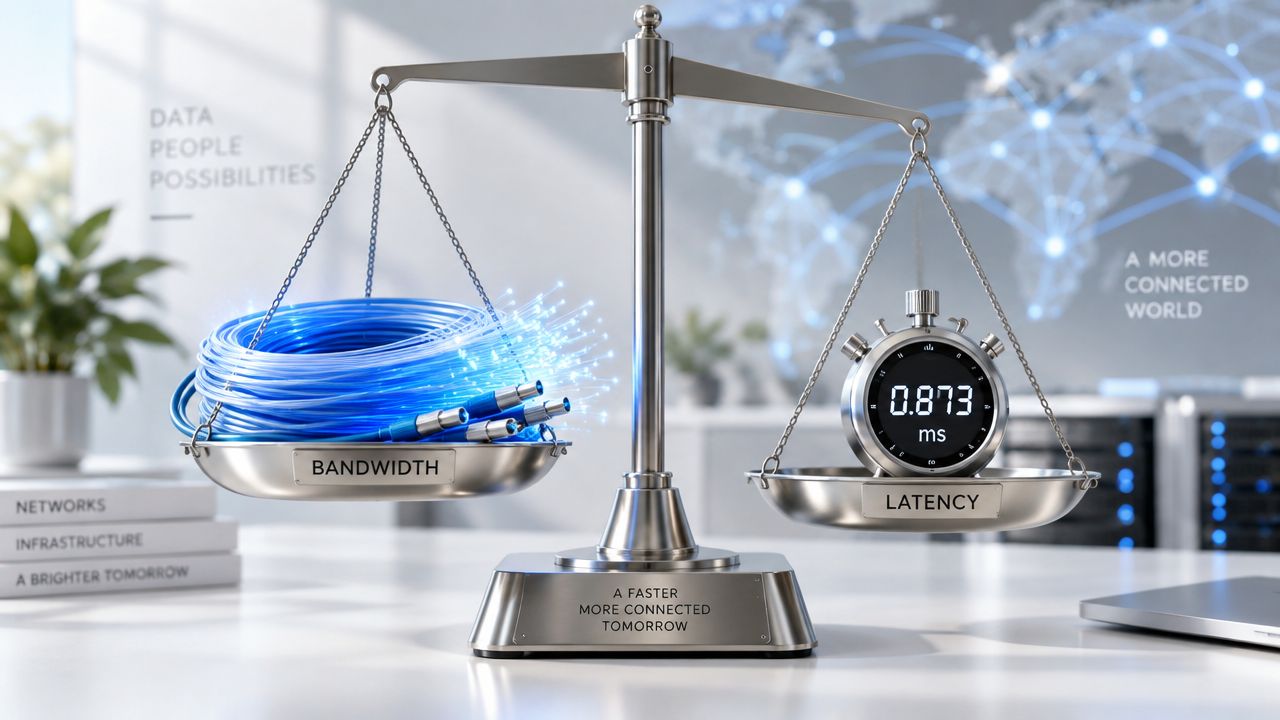
Your 500 Mbps fiber plan looks impressive on paper, yet your Zoom call freezes mid-sentence while another person in the house streams video without a problem. You run a speed test, see a strong result, and wonder why the connection still feels broken. The missing piece may not be how much data your connection can carry, but how quickly it responds.
Bandwidth and latency measure different parts of network performance. Bandwidth handles volume, while latency handles delay. You need to evaluate both to understand why streaming, gaming, browsing, uploads, or video calls feel slow.
| Performance dimension | What it measures | Typical unit | What it affects most |
|---|---|---|---|
| Bandwidth | How much data a connection can carry per second | Mbps or Gbps | Streaming quality, downloads, uploads, multiple devices |
| Latency | The round-trip time for a data packet to travel to a destination and back | Milliseconds, or ms | Gaming, video calls, remote desktop, page responsiveness |
| Jitter | How much latency changes from packet to packet | Milliseconds, or ms | Choppy calls, unstable gaming, inconsistent real-time traffic |
Why Your Internet Still Feels Slow on a Fast Plan
Your 500 Mbps plan can look excellent while a Zoom call freezes mid-sentence, an online game reacts late, or a webpage takes several seconds to respond. The connection may have enough capacity for everyone at home, yet each request can still take too long to complete.
Bandwidth and latency create separate performance limits. Bandwidth determines how much data can move at once, which matters for streaming, downloads, and several active devices. Latency determines how quickly an exchange begins and returns, which matters for conversation, gaming, and interactive browsing. They work together, not as alternatives.
A speed test can therefore produce a reassuring result without explaining the frustration. It mainly measures throughput, or the volume of data transferred during the test. Your call or game may instead be affected by responsiveness, network congestion, wireless interference, or changing delay between packets.
The hidden difference behind the lag
The Federal Communications Commission defines latency as the round-trip time for a packet to travel across a network and return. The FCC also notes that high latency can harm interactive services such as voice calls, video chat, and online gaming. Its 2025 fixed-broadband report found that latency increased by 6.5% during peak periods across all technologies, even when advertised speeds stayed the same.
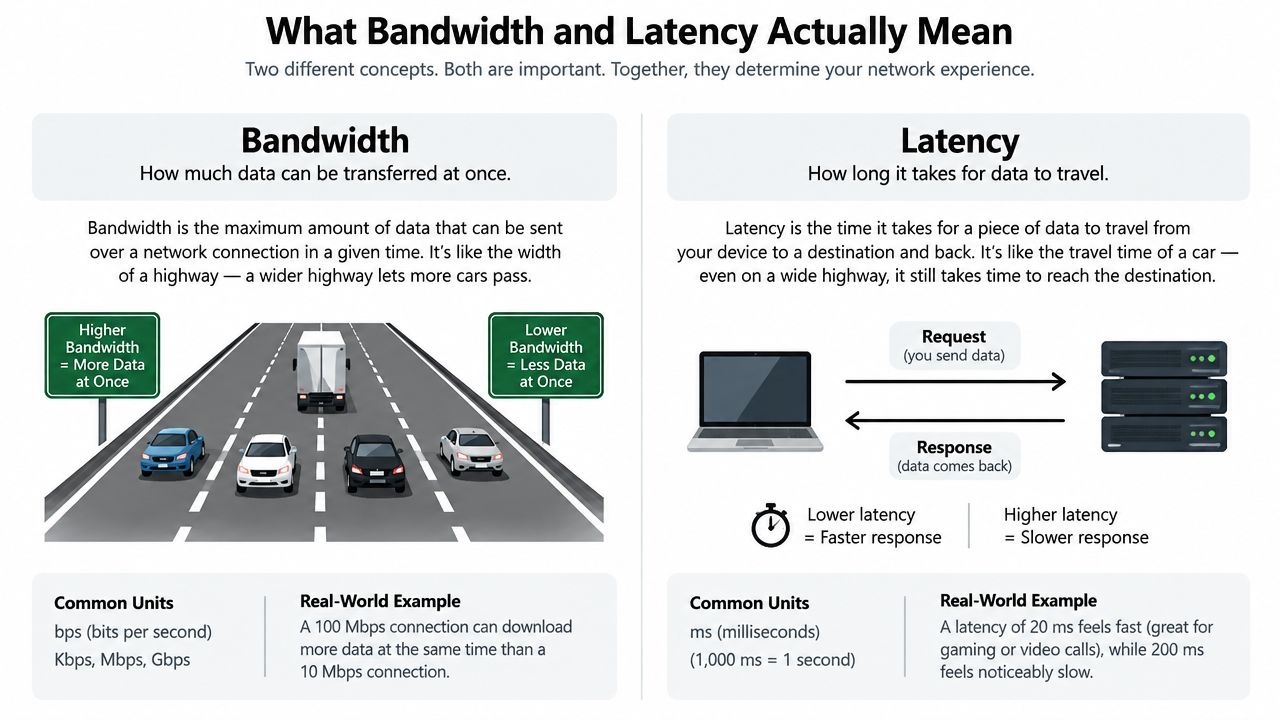
A wide road can carry many vehicles at once, much like a high-bandwidth connection can carry a large volume of data. Low latency is the shorter travel time for each individual request. A connection can have one without the other, so a fast download does not guarantee a quick response in a game or video call.
If you are investigating why your Wi-Fi is so slow, check the wireless connection separately from the service plan. Offices and distributed networks can also compare SD-WAN edge solutions because routing and edge design affect how traffic reaches applications.
Practical rule: A speed test asks, “How much data can I move?” A ping test asks, “How long must I wait for a response?”
The right upgrade depends on the activity and the limiting dimension. More bandwidth may help a busy household stream several videos, while lower latency may make a Zoom conversation or game feel responsive.
What Bandwidth and Latency Actually Mean
Bandwidth is capacity. It describes the amount of data a connection can carry per second. Internet providers usually express it in megabits per second, or Mbps, and faster plans may use gigabits per second, or Gbps.
Think of bandwidth as the width of a highway. A wider highway can carry more vehicles at the same time. In networking, that larger capacity helps when several people stream, download games, back up photos, or upload files simultaneously.
Latency is delay. It describes how long a packet takes to travel to a destination and for the response to return. The FCC uses this round-trip definition, and network tools report the result in milliseconds, or ms.
What the tools are measuring
A speed-test app reports download and upload performance, which represent data capacity in each direction. It may also report ping, the test commonly used to estimate round-trip latency. A connection could show high download bandwidth while reporting a noticeably higher ping, and those results aren't contradictory.
A command-line ping sends a small request and measures the response time. It doesn't ask how much data your connection can carry. It asks how quickly a destination answers. Traceroute takes a different approach by showing the sequence of network points, or hops, along the route, helping you see where delay may accumulate.
Why jitter deserves attention
A stable connection needs more than a low average. Jitter is the variation in latency over time. If one packet arrives quickly and the next takes much longer, a video call can sound broken or appear out of sync even when the average ping looks acceptable.
The distinction matters for newer wireless services, too. Tech Today's guide to 5G Ultra Wideband discusses why low latency changes the feel of connected applications. The basic lesson remains the same across access types: bandwidth determines how much can move, latency determines how soon a response arrives, and jitter determines how consistently that timing holds.
A useful engineering concept is the bandwidth-delay product, which expresses the amount of data that can be in flight as bandwidth multiplied by round-trip time. The foundational explanation at Netlib shows why a high-capacity path can still behave poorly for interactive traffic when delay is large. Geography makes that especially visible. BroadbandNow's 2026 U.S. data reports an average state median round-trip latency of 23.2 ms, with New York at 7.0 ms and Hawaii at 98.8 ms. Those figures show how far-away destinations can feel slower even on high-bandwidth services.
How Bandwidth vs Latency Affects Everyday Activities
Different activities stress different parts of your connection. Streaming usually needs sustained download capacity, while gaming depends more heavily on fast, consistent exchanges. Video calls need both directions to work well because you're sending your camera and microphone data while receiving everyone else's.
The following targets come from the activity examples in this guide's brief. Treat them as practical reference points, not universal guarantees. The server location, application design, Wi-Fi conditions, and number of simultaneous users can all change the result.
| Activity | Bandwidth needed | Latency target | Bottleneck |
|---|---|---|---|
| 4K video streaming | About 25 Mbps | Can tolerate several seconds of buffering | Bandwidth during sustained playback |
| Competitive online gaming | About 5 Mbps | Under 50 ms | Latency and jitter |
| Video calls | 3 to 5 Mbps per stream | Under 150 ms | Both, with latency affecting conversation flow |
| Large file uploads | Higher upload capacity | Less important than upload throughput | Upload bandwidth |
| Web browsing | Usually modest | Low responsiveness matters most | Latency for repeated requests |
Streaming and large transfers
A high-resolution stream can consume substantial download capacity, especially alongside other devices. Buffering lets many streaming services hide ordinary delay because the player can collect content before you watch it. That makes bandwidth the more visible constraint for sustained video.
Large uploads work similarly, but in the opposite direction. Sending a video archive, cloud backup, or project folder depends on upload bandwidth, which often receives less attention than download speed. A plan with strong downloads can still feel slow when the outbound channel is narrow.
A 2026 SDN video-streaming study reported that high-resolution video could take about 3 seconds to start at 1 Mbps and still buffer continuously at 3 Mbps, illustrating how startup behavior and sustained capacity interact. The findings are described in the study publication.
Gaming and browsing
Competitive games exchange small updates repeatedly. The game doesn't necessarily need a huge data pipe, but it does need your action to reach the server and the response to return quickly. High latency creates the familiar delay between pressing a button and seeing the result, while jitter makes that delay unpredictable.
Web browsing has a different rhythm. A page may require several requests for text, images, scripts, and other elements. If each request waits on a distant or congested route, the page can feel unresponsive even when the eventual download is small.
Video calls sit between these examples. They need enough upload and download bandwidth for clear audio and video, but high latency causes people to talk over each other, pause for delayed replies, or see frozen frames. For workloads that need responses close to the user, edge computing benefits can help explain why placing processing nearer to users matters.
Measuring Both Numbers at Home With Free Tools
You don't need enterprise monitoring equipment to separate bandwidth problems from latency problems. A few repeatable tests can show whether your connection lacks capacity, responds slowly, or becomes unstable under load.
Start with a speed test
Open Speedtest.net or Fast.com and record:
- Download bandwidth: How quickly your connection receives data.
- Upload bandwidth: How quickly it sends data.
- Ping or latency: The round-trip response time reported by the test.
- Jitter: The variation, if the tool displays it.
Run the test while connected over Wi-Fi, then repeat it with Ethernet if possible. Test during a quiet period and during the time when your household notices problems. A single result is a snapshot. A short log reveals patterns.

Watch ping over time
On Windows, open Command Prompt and run ping 8.8.8.8 -t. On macOS or Linux, open Terminal and run the equivalent ping command without relying on a permanent loop if your system uses different options. Let it run for about a minute, then stop it and inspect the response times and any timeouts.
Look for consistency rather than one isolated result. Repeatedly high responses, sudden spikes, or missing replies point to a responsiveness or stability issue. Compare the same test on wired and wireless connections to determine whether the problem begins inside your home.
Use traceroute to inspect the route
Windows uses tracert google.com, while macOS and Linux commonly use traceroute google.com. The output lists hops between your device and the destination. A delay that appears immediately may involve your local router or access link. Delay that begins farther along can suggest an upstream route or destination-side issue, though individual hops may also deprioritize diagnostic replies.
For a broader operational approach, this overview of how to monitor network performance explains why repeated measurements are more useful than a single test. At home, a spreadsheet with date, time, connection type, server, download, upload, ping, jitter, and notes is enough to make congestion visible. If the basics still don't resolve the issue, use this guide on how to fix a slow internet connection to check common local causes.
Why More Bandwidth Does Not Always Fix Lag
Buying a faster plan makes sense when the connection is running out of capacity. It doesn't automatically improve the time required for a packet to travel. A 500 Mbps fiber line with 180 ms ping can produce awkward pauses during a video call, while a 25 Mbps DSL line with 12 ms ping can support responsive gaming when its capacity isn't under pressure.
Those examples isolate the two dimensions. The fiber connection can carry far more data, but its high delay makes real-time conversation uncomfortable. The DSL connection has less capacity, yet its short round-trip time can make small game updates feel immediate.
| Activity | Bandwidth-limited? | Latency-limited? | Does a bandwidth upgrade help? |
|---|---|---|---|
| Video call conversation | Sometimes | Often | Only when capacity is insufficient |
| Competitive gaming | Usually less | Yes | Not if ping or jitter is the problem |
| Large download | Yes | Less | Usually, if the link is saturated |
| Remote desktop | Sometimes | Often | Not when input delay is the main issue |
| Multiple simultaneous streams | Yes | Sometimes | Often, if household demand exceeds capacity |
Why latency rises on a fast connection
Several conditions can add delay without changing the plan advertised by your provider:
- Last-mile congestion: Traffic may queue before it reaches your home.
- Wi-Fi retransmissions: Interference can force devices to send packets again.
- Distant servers: A long physical route adds travel time.
- Loaded links: Heavy uploads or downloads can make other traffic wait.
Ookla's 2026 U.S. Converged Consumer Experience Report found major provider differences in loaded latency. AT&T led download-loaded latency at 322 ms, while Verizon led upload-loaded latency at 308 ms. That comparison reinforces an important point: responsiveness can change by traffic direction and congestion, not just by the headline speed number.
Before upgrading, check how to improve Wi-Fi signal strength. If the bottleneck is wireless interference or queueing, a faster plan may leave the actual lag untouched.
Troubleshooting Tips to Improve Speed and Responsiveness
Start with the symptom you can observe. Buffering, input delay, and inconsistent call quality often have different causes, so applying the same fix to all three wastes time.
If videos buffer or downloads crawl
Reduce competition for download capacity first. Pause cloud backups, game downloads, photo syncing, and other background transfers while testing. Then try Ethernet for the device that needs reliable performance, update router firmware, and move the router away from thick walls and household equipment that can interfere with wireless signals.
A wired test also separates the internet service from the Wi-Fi environment. If Ethernet performs well while Wi-Fi struggles in the same period, your plan may not be the main problem.
If games lag or calls sound delayed
Real-time applications need consistent response times. Connect the gaming system or work computer to Ethernet when practical. If you must use Wi-Fi, try the 5 GHz band when the device is close enough, turn off a VPN that you don't need for that activity, and select a game server that is geographically closer.
QoS, or Quality of Service, can help a compatible router prioritize voice, video, or gaming traffic when another household member is uploading or downloading heavily. It won't create additional bandwidth, but it can prevent real-time packets from waiting behind bulk transfers.
If performance keeps changing
Variable quality points toward jitter, packet loss, interference, or congestion. Repeat ping tests at different times, compare Wi-Fi with Ethernet, update network drivers, and replace outdated networking equipment if it can't handle your current devices. If the results remain poor outside your home network, contact the ISP with your test log rather than describing the issue only as “slow.”
A few simple maintenance steps also help:
- Restart the router: Reboot it periodically when performance gradually deteriorates.
- Secure the Wi-Fi: Change the password if unknown devices may be consuming capacity.
- Use a mesh system: Extend coverage in a larger home where distance causes weak signals.
- Check the connection path: Use traceroute when delays appear beyond your local network.
If a computer won't connect properly, this practical guide to fix Wi-Fi connection can help separate device setup problems from broader network faults.
Finding Your Real Bottleneck and What to Upgrade Next
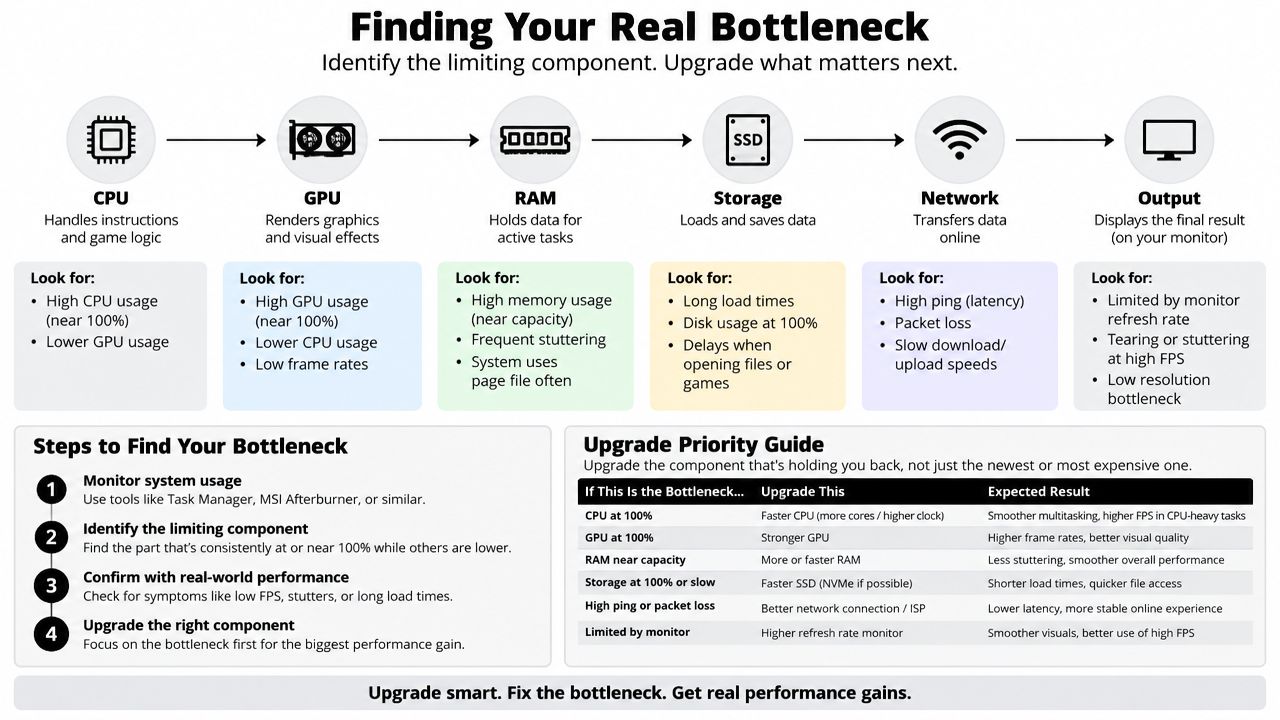
Use a simple decision process before spending money.
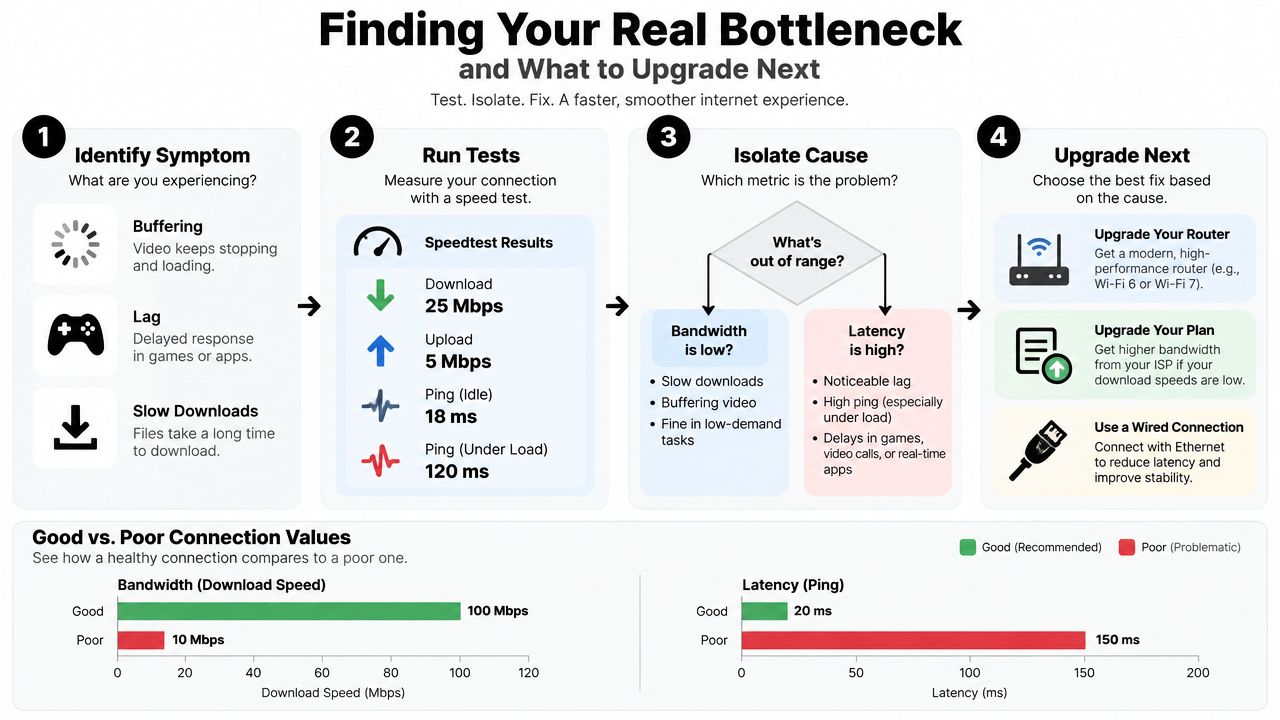
First, name the symptom. Buffering and slow downloads suggest a capacity problem. Game rubber-banding, delayed Zoom replies, and remote desktop lag suggest a latency or jitter problem. A call that freezes only when someone starts a large upload may involve both.
Next, measure both dimensions. Run a speed test that records download, upload, and ping. Follow it with a sustained ping test, then compare Wi-Fi and Ethernet. If the numbers change sharply during a busy period, congestion is part of the diagnosis.
Then, match the fix to the activity. Multiple high-resolution streams that stutter may justify more download bandwidth. A gaming device with ping spikes may benefit more from Ethernet, a better router position, or a closer server. Household congestion may call for QoS, while a traceroute showing trouble beyond your home network gives you evidence to share with the ISP.
Finally, upgrade only the limiting component. Choose a faster plan when your measured capacity cannot support the household's simultaneous demand. Improve the local wireless setup when the wired connection is healthy but Wi-Fi is unstable. Investigate the provider or route when local tests look good but distant destinations remain slow.
Bandwidth and latency aren't alternatives. Bandwidth determines how much data can move, while latency determines how quickly an exchange completes. Measure both, connect the result to the activity that bothers you, and you'll avoid paying for capacity when the problem is responsiveness.
Tech Today offers clear technology explainers and practical troubleshooting guides that turn networking terms into everyday decisions. Visit Simply Tech Today to find more straightforward advice for diagnosing internet performance and choosing the right fix.

Member discussion